Due to the measures put in place because of COVID-19, we are still required to work from home as much as possible. Do you perhaps already miss that comfortable office chair? Or your desk? Or perhaps the chance to move about during a day’s work from home? Working from home is leading to an increasing number of physical complaints. A major cause of this is poor sitting posture. In this article, we’ve put together some tips on how you can improve your sitting posture.
Improving your sitting posture while working from home
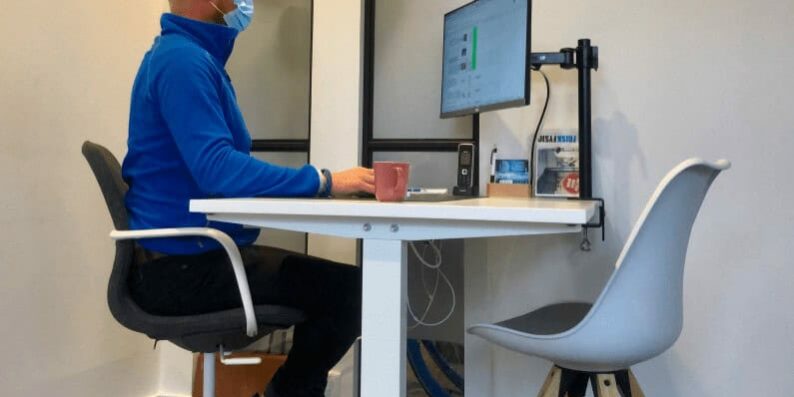
The most important thing when working from home is how you sit whilst working, as you spend a great many hours at your computer. It is important that you sit correctly whilst working, so that you do not develop any physical complaints. These include (lower) back pain, shoulder problems and neck pain. You can improve your sitting posture in six steps.
- Eyes and neck when working from home
Make sure your neck stays straight – so don’t let your head droop forwards. It’s also important to focus your eyes on the top of the screen or just below it. This will help prevent neck problems if you spend many hours at a time looking at your computer.
- Upper back when working from home
When working from home, it’s a good idea to sit upright so that your upper back is supported. This active posture helps prevent a stiff and painful back. It is also very important to keep your shoulders relaxed: don’t let them slump forwards or hunch up. You can do this by supporting your arms in the right places.
- Arms and wrists when working from home
Whilst working, it is important that your arms are relaxed, resting at your sides and at a 90-degree angle. It is also important to rest your wrists flat on the armrest or table, so that your fingers are relaxed. If you are unable to position your upper and lower arms at a 90-degree angle, it is advisable to raise your chair or sit on a raised surface, such as a cushion. You could also sit at a lower or higher table to maintain the correct posture.
- Hips and lower body when working from home
Make sure you sit right at the back of the chair. Your hips should be against the backrest to support your lower back. To ensure you remain sitting upright, you should press your back firmly against the entire backrest. This will help prevent a sore or stiff back whilst you are working.
- Knees and lower legs when working from home
When sitting in your chair, make sure your legs are at a 90-degree angle. This reduces pressure on the back of your thighs. Your knees should not touch the seat. If this is not the case, you can adjust the seat of an adjustable office chair. If you do not have an office chair, you can place a cushion against the backrest.
- Feet when working from home
When adjusting the seat height, make sure your feet can rest flat on the floor. Your feet should not dangle, and you should not position them too far forward. If you do not have an office chair, try adjusting the height using a cushion to sit higher, or a footstool to rest your feet on if the chair is too high.
A good and healthy workplace when working from home
Besides good sitting posture, there are several other necessities for a good and healthy workplace while working from home. Many people sometimes struggle to find work-life balance while working from home, as separate environments are now merged into one.
- Alternating between sitting, standing and walking is a good way to avoid static strain. For example, change your working position every hour.
- Was it standard practice for you to use an adjustable office chair at work? Discuss with your line manager the possibility of taking your office chair home. You will, however, need to adjust the chair to suit your home environment, for example, to the height of the table.
- Do you use a laptop? If so, make sure you can use it at the right height to prevent neck problems. An external mouse and keyboard are therefore essential for maintaining the correct sitting posture.
- Get some exercise. Take a walk in the afternoon, for example, so you can enjoy the sun and fresh air for a while.
- As you can work from home, you can set your own working hours. So make sure you work at times that suit you. Do you have children, for example? If so, start your working day when the children are at school, asleep or playing outside.
- Drink lots of water.
- Move your printer further away so that you have to walk. If you need to fetch something from the printer, you’ll get a bit of exercise.
Are you still experiencing pain in your back, arm, neck or shoulder whilst working from home?
Do you suffer from back, arm, neck or shoulder problems? We at FRISKFYSIO can help you with that. Please contact with us for more information or advice.